Players forget where you were
Some popular media players quietly discard your resume point in the first and last few percent of a file. In a 10-hour audiobook, that can be the whole first half hour.
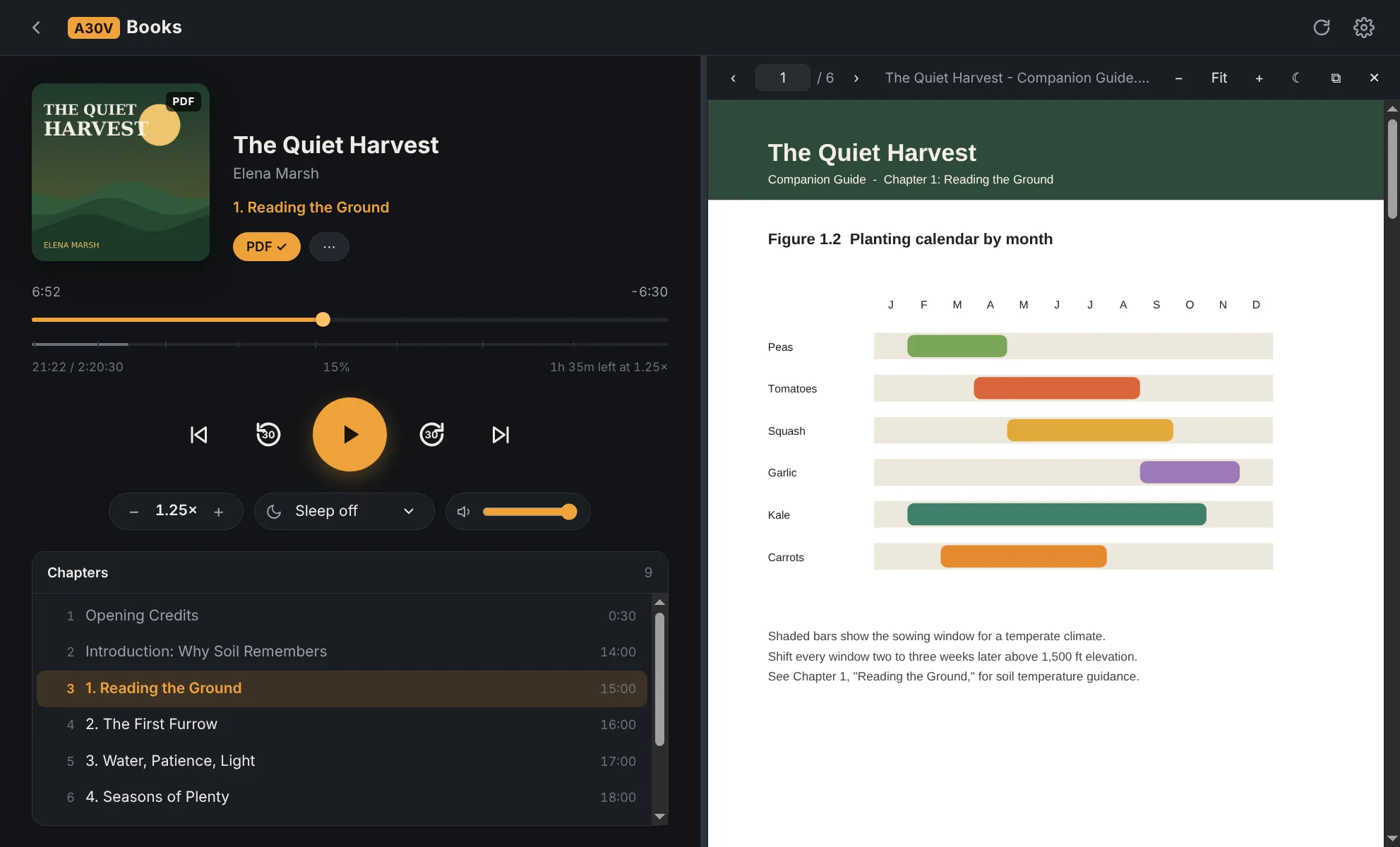
A30VBooks plays the M4B and MP3 audiobooks you already own, remembers your exact spot every time, and opens the book's companion PDF right next to the audio, with the charts, maps and worksheets the narrator keeps telling you to "see."
Some popular media players quietly discard your resume point in the first and last few percent of a file. In a 10-hour audiobook, that can be the whole first half hour.
Many audiobooks ship with a companion PDF. You end up hunting for it in a downloads folder, opening a second app, and losing track of both.
If you buy DRM-free books or keep your own library on a drive or NAS, you need a player that treats that library as the main thing.
Everything below works in the current build that early testers will get.
Your position saves every few seconds and whenever you pause, skip or close, and it survives a crash or power loss. No 5% rule.
Finds the book's PDF automatically, shows it in a resizable side panel or its own window for a second monitor, and remembers which page you were on.
Reads the chapter list inside M4B files, so you can jump between chapters, see time left in the chapter, and track the whole book.
A folder of MP3 tracks, even split into CD1 and CD2 folders, plays as one continuous book with one bookmark.
Point it at local folders or network drives. Copies of the same book in two places share one saved position.
Speed from 0.5× to 3×, adjustable skip buttons, a sleep timer that fades out, Windows media keys, and light and dark themes.
Join the list and you'll be among the first to get a download link. The few quick questions tell us whether to build this as a real product and which features matter most.
Your answers are used only for A30VBooks updates and product decisions. See the privacy policy.
A30VBooks plays DRM-free files: M4B, M4A and MP3 (plus FLAC, OGG and WAV). Copy-protected downloads such as Audible's .aax files aren't supported, and A30VBooks does not remove copy protection.
Windows comes first. The app is built so a Mac version is realistic, and the signup form above is how we'll judge demand for it.
No. It runs on your computer, reads your own folders, and stores your bookmarks locally. Nothing about your library is uploaded.
Pricing isn't set yet. The plan is a one-time purchase rather than a subscription, and people on the early-access list get launch pricing.
From your book's folder. Many audiobooks include a PDF supplement; A30VBooks finds one with a matching name automatically, or you can attach any PDF yourself.
Early access opens to the list in small batches. Join above and you'll get an email with the download link.